
Four ways to get your online orders onto paper
Every one of them works. They cost very different amounts, fail in very different ways, and the right answer depends on things nobody asks you about — like whether anyone will notice when the printing stops.
The short version
These are not four attempts at the same product. They are four different trades between money, moving parts, and how much attention the thing needs.
We make one of these four. OrderPrint is the phone option, further down this page. We have tried to be straight about the other three, including where they beat us — if you only print occasionally, or you need one system driving printers across several sites, we are not your answer.
A cloud printer
- A printer with its own internet connection
- No computer needed
- Prints on its own
- Highest hardware cost
- Must be that vendor's own model
A computer and a print service
- Subscription, usually per printer
- A computer must stay on all day
- Prints on its own
- Best for several printers or sites
- Uses printers you already own
Your shop's print button
- Built in, and free
- Someone has to click it
- Not automatic
- Usually an A4 page, not a ticket
- Fine for occasional packing slips
A phone — OrderPrint
- Any Bluetooth or network thermal printer
- No computer, no cloud service
- Prints on its own
- Works with any shop that emails orders
- Free for 100 orders a month
If you are here because Google Cloud Print shut down
Google Cloud Print was switched off on 31 December 2020. It let a website, or a phone, send a job to any printer through Google's servers, and a lot of small shops used it to get orders onto a receipt printer without a computer in the loop. Nothing from Google replaced it.
The four routes below are what people moved to, and each one keeps a different part of what Cloud Print did:
- A cloud printer keeps the no-computer part, but only for printers built with their own internet connection.
- A computer and a print service is the closest like-for-like replacement. PrintNode is the service most plugins use, including WooCommerce's own automatic printing extension, and ReceiptKit does the same job with a free desktop app. Both need a computer switched on.
- Your shop's print button is what most people fell back to, and it is why so many orders now get printed by hand.
- A phone keeps the no-computer part and works with the printer you already own. That is the route OrderPrint takes.
A cloud printer
The printer itself has an internet connection. Your shop, or a service in the middle, sends the order straight to it. Nothing else in your shop has to be switched on.
When it is the right answer
When you want the fewest moving parts and have the budget for it. This is the most robust option on this page and it deserves that reputation. There is no phone to be knocked off a counter, no operating system deciding to save battery overnight, no app to update. You buy a box, you mount it, it prints.
It is also the option with a support number attached. If it stops, there is a vendor whose job is to care.
Where it falls short
The printer is the product, so you are buying a printer at a premium — and buying into that vendor. A second printer at the counter costs the same again, and a perfectly good thermal printer you already own cannot be used, because it does not have the radio.
Some setups also depend on the vendor's cloud service continuing to exist and continuing to be free. A small risk, but outside your control.
A computer and a print service
A computer in the shop runs a small program. A service connects your shop to that program and sends it the order. The computer prints to any printer attached to it.
Two examples, so you know what to search for: PrintNode is a subscription service that many shop plugins send jobs through, including the automatic order printing extension sold by WooCommerce itself. ReceiptKit is a free WordPress plugin with a free desktop bridge app that prints to Star, Epson and ESC/POS printers as orders arrive. Both are well made. Both need the computer running.
When it is the right answer
When you already run a computer that stays on anyway, and you have several printers to manage. If a POS machine is already humming behind the counter, this adds almost no new hardware.
It is the most flexible option here: many printers, many branches, central control, and it will talk to almost anything. For a multi-site business with someone technical, this is often the correct answer and the others are compromises.
Where it falls short
A computer has to be on, all day, every day. That is a real cost — the machine, the power, and the fact that Windows will pick a Tuesday lunchtime to restart for updates. If the computer sleeps, the printing stops.
The subscription is usually per printer, so the cost grows exactly as your shop does. And the chain has more links in it: shop, service, computer, printer. Each one is a place it can quietly stop.
Your shop platform's own print button
Shopify, WooCommerce and Wix all have some way to print an order or a packing slip from the admin screen, usually through the browser.
When it is the right answer
When printing is occasional and someone is already at the screen. If you pack a dozen parcels in the morning and print the labels as you go, this is free, built in, and there is nothing to set up.
Adding anything else would be solving a problem you do not have.
Where it falls short
It is not automatic. Someone has to see the order, open it and click print. In a shop that is fine. In a kitchen during service, the whole problem is that nobody is looking at a screen — and a print button does not help with that.
It also usually prints an A4-shaped document rather than a kitchen ticket.
A phone — this is OrderPrint, the one we make
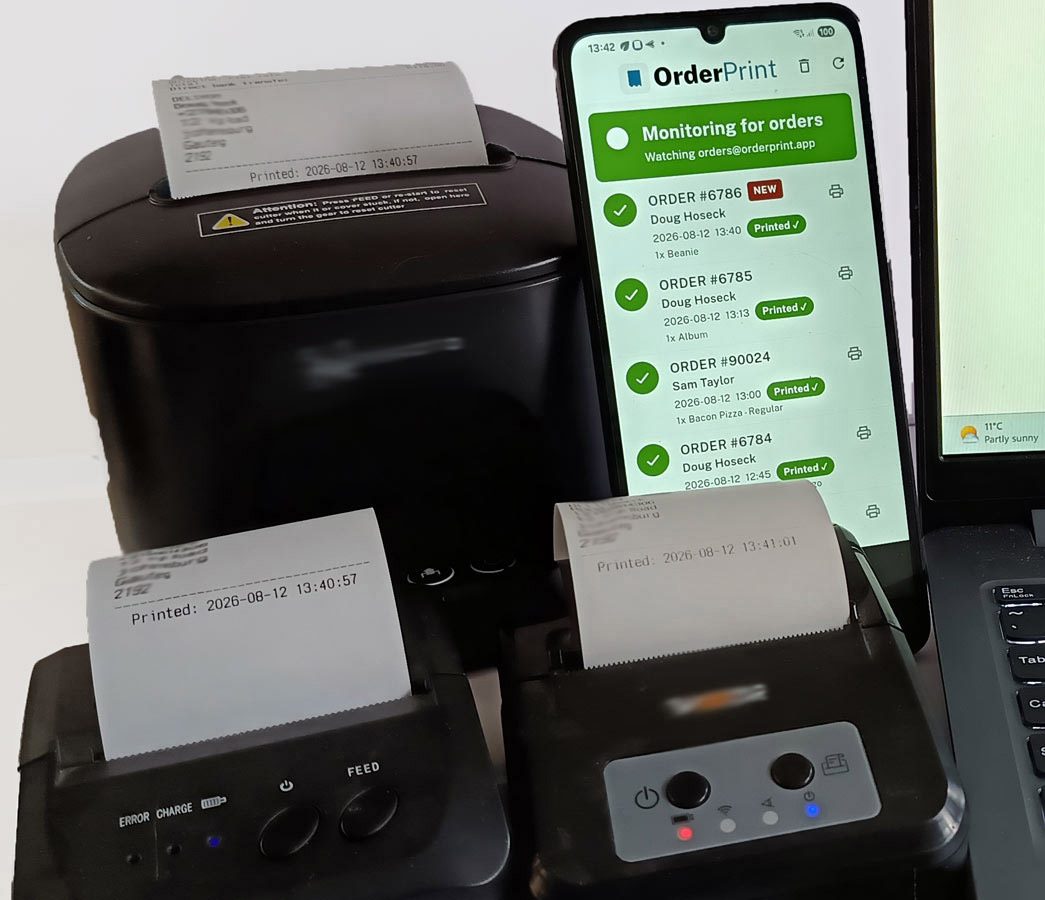
An ordinary Android phone sits by the till with OrderPrint on it. It watches the mailbox your shop already sends order emails to, and prints each new order to a Bluetooth or network thermal printer. There is no OrderPrint server in the middle — the phone reads the mailbox itself.
When it is the right answer
When you want automatic printing without buying a printer you do not need or leaving a computer on. The hardware is a cheap thermal printer and a phone you probably already own.
Because it works from the order email rather than an integration, it does not care which platform you sell on. If it emails an order, it prints. It also assumes printing will eventually fail, and tells you when it does.
Where it falls short
It is a phone, and phones are phones. It needs to stay plugged in with the screen on, because Android will otherwise decide a background app is not worth keeping alive. It can be knocked off a counter. A dedicated cloud printer has none of those failure modes and we are not going to pretend otherwise.
It also depends on the order email arriving — a host that junks one is a host the phone never hears from. And billing is per phone, so a second till needs its own subscription.
So which one
Occasional printing, someone at the screen. Use the print button your platform already gives you. Do not buy anything.
A busy kitchen, budget available, wants the fewest moving parts. A cloud printer. It is the most robust answer on this page.
Several printers, multiple sites, a computer already running, someone technical. A computer and a print service.
Automatic printing, low cost, hardware you may already own, any shop platform. A phone. That is what we built OrderPrint for.
Questions
Do I need a special printer for OrderPrint?
No. Any thermal receipt printer that takes Bluetooth or network, in 58mm or 80mm. That is the main difference from a cloud printer, which has to be that vendor's own model.
Can I use the printer I already have?
If it is a Bluetooth or network thermal receipt printer, almost certainly yes. There is a test print during setup, so you will know within the first five minutes rather than during service.
Is a cloud printer more reliable?
For pure uptime, a dedicated cloud printer has fewer things that can go wrong than a phone does — no battery manager, nothing to knock over. What it does not usually do is tell you when it has stopped. We would rather be told.
Do I need a computer running?
No. The phone does everything. It needs internet — the same Wi-Fi your printer is on is fine.
Will it work with my shop platform?
If your shop emails you when an order comes in, yes. OrderPrint reads that email. WooCommerce, Shopify and Wix have their own setup pages, and anything else that sends an order email works too.
What does it cost?
Free for the first 100 orders a month, and paid plans start at $6.99 a month. One subscription covers one phone.
What replaced Google Cloud Print for receipt printers?
Nothing from Google. The practical replacements are a print service such as PrintNode running on a computer in the shop, a cloud-connected receipt printer from a vendor like Epson or Star, or an app on a phone that reads your order emails and prints them, which is what OrderPrint does. The right one depends on whether you want to keep a computer on all day and whether you already own a printer.
Try it before you buy anything
OrderPrint is free for your first 100 orders a month. No account, no card. If it does not suit your shop you will know within a day — and you will not have bought a printer to find out.